

Locate Your Support PIN
The Support PIN is used to verify account ownership when requesting sensitive
service changes or contacting support regarding your VPS.
Find the PIN in Your Welcome Email
After ordering a VPS, EDBB automatically sends a credentials email containing your server details and Support PIN. Look for one of these email subjects:- EDBB: Your Linux VPS Credentials
- EDBB: Your Windows VPS Credentials
Find the PIN in the VPS Control Panel
1
Open your VPS summary
Sign in to the EDBB Control Panel and open the VPS from Services.
2
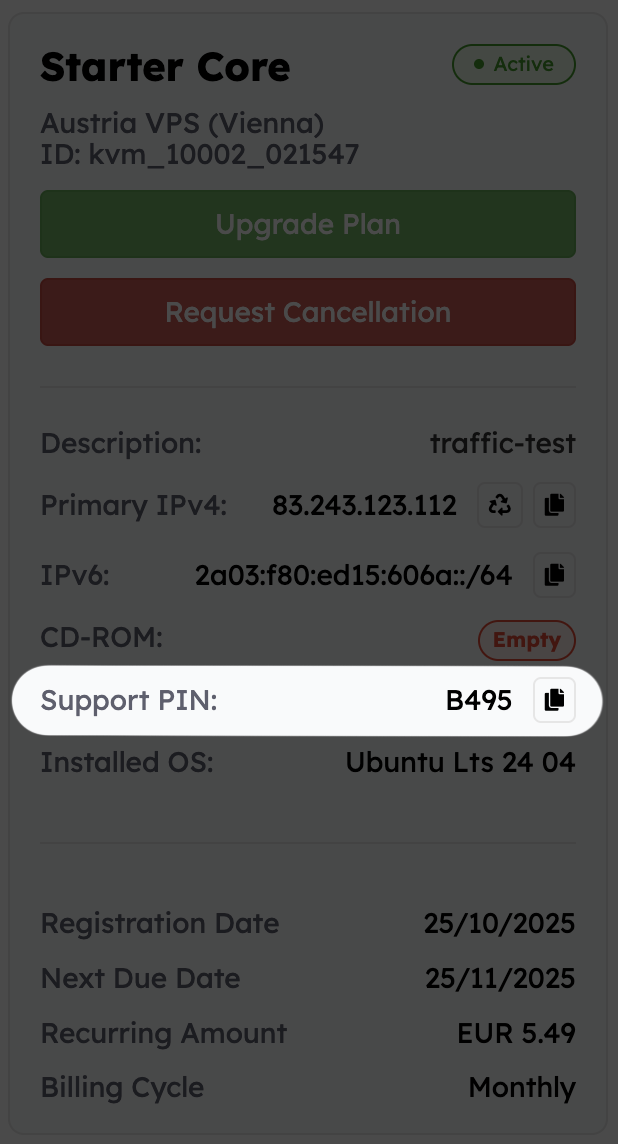
Check the Summary card
The Summary section displays important VPS details including the KVM ID, hostname, operating system, and your Support PIN.
3
Store it safely
Save the PIN in a password manager or internal documentation system so it is available when needed.
When You May Need the Support PIN
You may be asked to provide the Support PIN for requests such as:- 🔐 Ownership verification
- 🛠️ VPS-related configuration changes
- 🌐 IP or rDNS modifications
- 🚨 Security or abuse investigations
- 💳 Billing-related account validation
Security Recommendations
🔒 Keep it private
Treat the Support PIN like a password and avoid sharing it publicly.
👥 Share carefully
Only provide the PIN directly to authorized EDBB support staff when requested.
⚠️ Lost access?
If you cannot locate your PIN, contact support through the online messenger or by email for assistance