

Price and availability
The Upgrades tab shows the available quantity and current price for your service. Check the recurring charge and total before paying. If the option is unavailable, ask support@edbb.com about availability.Order in the control panel
Open Services → My Services, select your VPS, then choose Upgrades → Upgrade Now under Upgrade Components. You can also use Add IP + in the Network tab.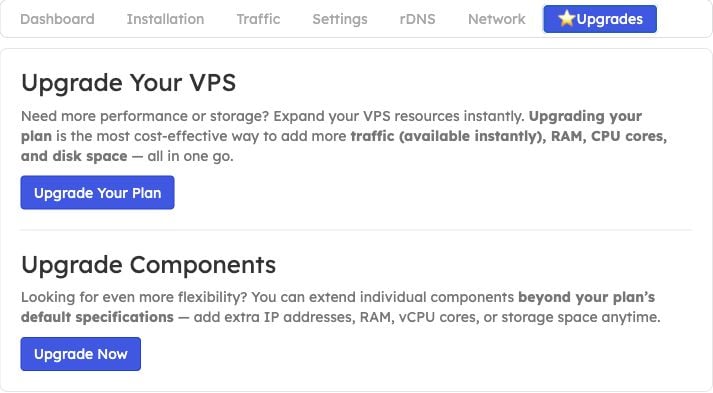
Use the Upgrade Components section to add IPs without changing the whole plan.
Choose the additional IP quantity
In Additional IPs, compare Current Configuration with New Configuration and select the quantity you need. Leave unrelated components on No Change, then click Click to Continue >>.
Example selection. Available quantities and prices are shown for your service.
Review the charge
Check the change description, tax and Total Due Today, then choose a payment method and continue with the order. Review the recurring price as well as today’s charge.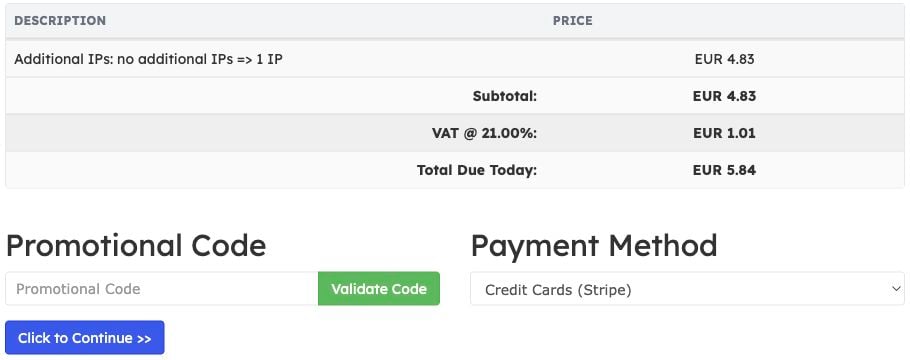
Example quote only. Your price and tax depend on your service, account and order date.
Find and configure the assigned addresses
After the order is paid and provisioned, open your VPS’s Network tab. Find the new addresses in IPv4 Configuration and copy their subnet mask and gateway. See IP settings for the field locations. Add the addresses to your operating system. They are not ready for use merely because they appear in the panel. Follow configure an additional Linux IPv4 address, or use the existing adapter’s advanced TCP/IP settings on Windows.Keep your existing primary address and gateway. Reinstalling is not necessary to add an IP address and would erase the VPS disk. Open the VNC console before changing network settings.