

Prep Checklist
Reverse DNS works best when the hostname already resolves forward to your VPS.
Create or update the A/AAAA record first so mail servers and reputation
services see a matching pair.
- Have the exact FQDN you want to publish (for example
mail.example.com). - Keep both IPv4 and IPv6 assignments handy—the Network tab lists them.
- Plan to use lowercase hostnames without trailing dots; the Control Panel formats PTRs automatically.
Update PTR Records in the Control Panel
1
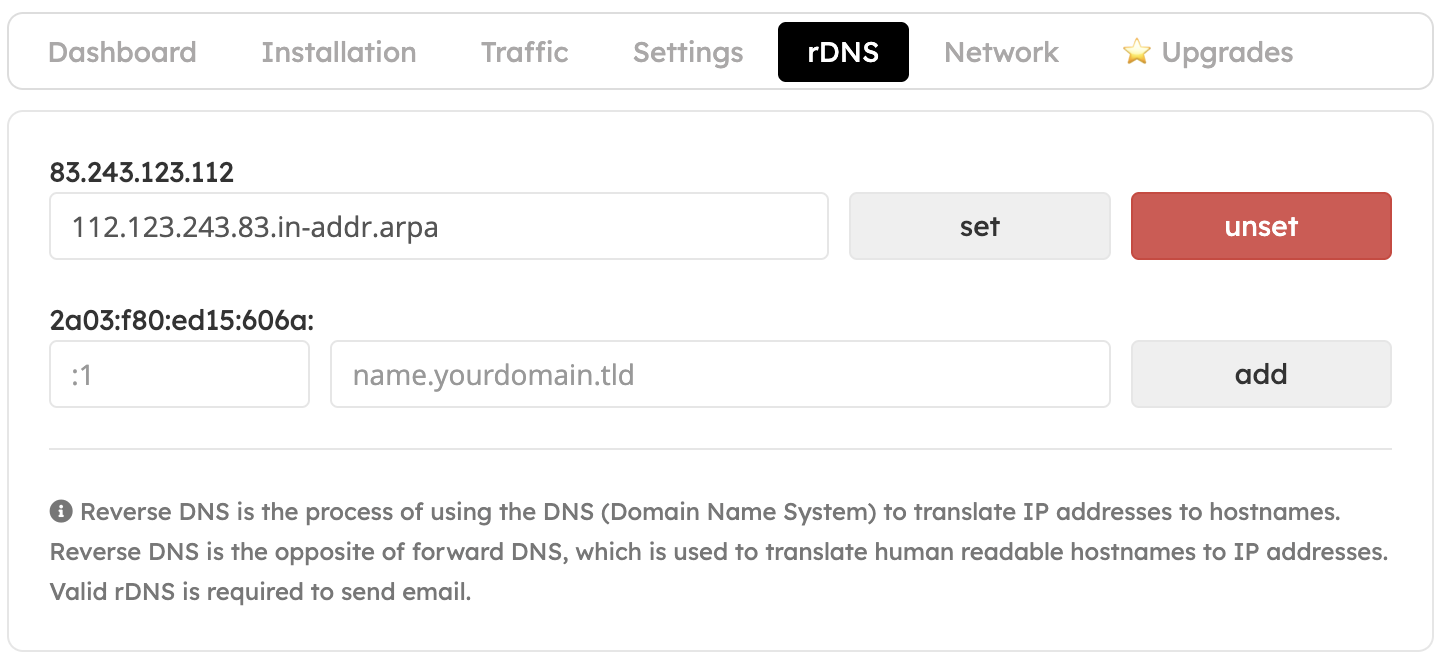
Open the rDNS panel
Sign in to the EDBB Control Panel, select your VPS under Services, and choose the rDNS tab.
2
Set the primary IPv4 hostname
Replace the default value with your hostname and click Set. Use Unset if you need to revert to the system default.
3
Add IPv6 reverse records
For each IPv6 address, enter the suffix (for example
:1) and matching hostname, then press Add.4
Review the summary
Confirm the updated entries in the list; edits take effect immediately on EDBB’s side.
Verify - Troubleshoot
- Use
dig -x <ip>or an external rDNS checker after a few minutes—public caches may need time to refresh. - If the hostname doesn’t appear, double-check that the forward record exists and matches exactly (including subdomain).
- Still seeing the old PTR? Clear local DNS caches or test from another network.