> ## Documentation Index
> Fetch the complete documentation index at: https://docs.edbb.com/llms.txt
> Use this file to discover all available pages before exploring further.
# How to Find and Use Your EDBB Support PIN
> Locate the Support PIN in the control panel or welcome email and understand when you may need it.
## Locate Your Support PIN
The Support PIN is used to verify account ownership when requesting sensitive
service changes or contacting support regarding your VPS.
***
## Find the PIN in Your Welcome Email
After ordering a VPS, EDBB automatically sends a credentials email containing your server details and Support PIN.
Look for one of these email subjects:
* **EDBB: Your Linux VPS Credentials**
* **EDBB: Your Windows VPS Credentials**
The Support PIN appears inside the **Plan Details** section together with your **KVM ID** and VPS information.
***
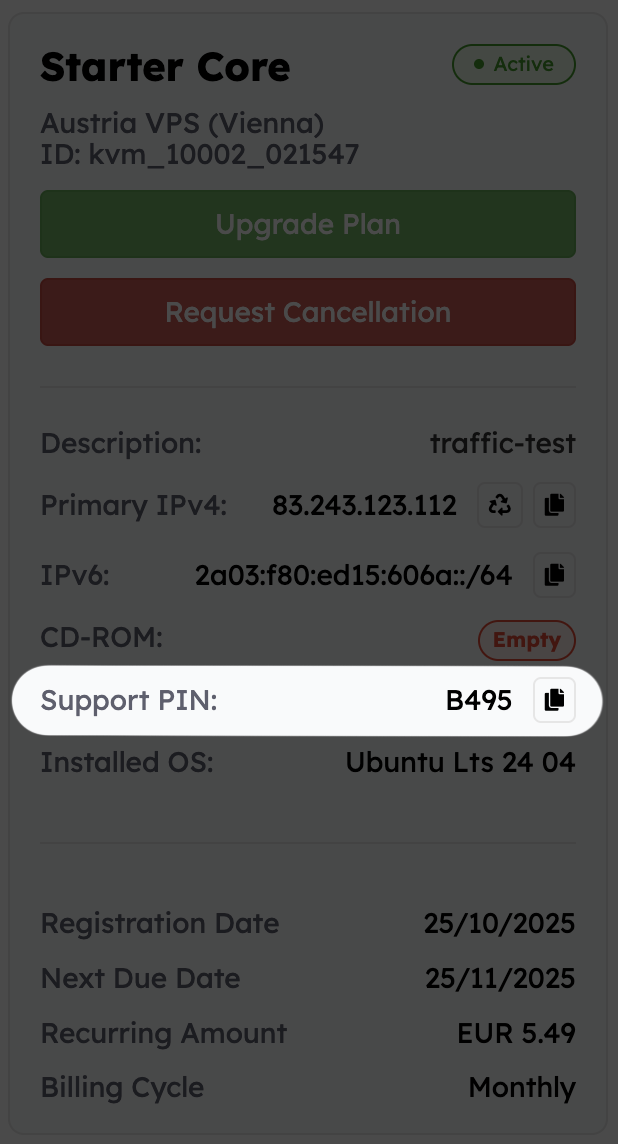
## Find the PIN in the VPS Control Panel
Sign in to the EDBB Control Panel and open the VPS from Services.
The Summary section displays important VPS details including the KVM ID, hostname, operating system, and your Support PIN.
Save the PIN in a password manager or internal documentation system so it is available when needed.
 ***
## When You May Need the Support PIN
You may be asked to provide the Support PIN for requests such as:
* 🔐 Ownership verification
* 🛠️ VPS-related configuration changes
* 🌐 IP or rDNS modifications
* 🚨 Security or abuse investigations
* 💳 Billing-related account validation
Providing the PIN together with your initial request helps speed up verification and reduces delays.
***
## Security Recommendations
Treat the Support PIN like a password and avoid sharing it publicly.
Only provide the PIN directly to authorized EDBB support staff when requested.
If you cannot locate your PIN, contact support through the online messenger or by email for assistance
If you contact support regarding a VPS issue, including the VPS ID and Support PIN in your first message can help the request get processed faster.
***
## When You May Need the Support PIN
You may be asked to provide the Support PIN for requests such as:
* 🔐 Ownership verification
* 🛠️ VPS-related configuration changes
* 🌐 IP or rDNS modifications
* 🚨 Security or abuse investigations
* 💳 Billing-related account validation
Providing the PIN together with your initial request helps speed up verification and reduces delays.
***
## Security Recommendations
Treat the Support PIN like a password and avoid sharing it publicly.
Only provide the PIN directly to authorized EDBB support staff when requested.
If you cannot locate your PIN, contact support through the online messenger or by email for assistance
If you contact support regarding a VPS issue, including the VPS ID and Support PIN in your first message can help the request get processed faster.