> ## Documentation Index
> Fetch the complete documentation index at: https://docs.edbb.com/llms.txt
> Use this file to discover all available pages before exploring further.
# EDBB Traffic Pool
> Learn more about your traffic pool, starter credit, how to get started in general (buy and assign traffic)
## What Is a Traffic Pool
The traffic pool is like a bank account holding a traffic reserve. Top-up your account and assign traffic to any VPS in your account when needed.
* Unused Pool Traffic does not expire.
* Hydration assigns traffic to a VPS (manual or auto at 99% usage)
* Traffic purchases are instant and are logged in the pool log.
* Traffic assignments are instant and are logged in the hydration log
***
## Traffic Pool Starter Credit
Starting **November 19, 2025**, every newly purchased VPS includes **100 GB of complimentary traffic**. We automatically add **+100 GB** to your Traffic Pool account for each new VPS you order. This starter credit lets you explore how the Traffic Pool works — and gives you a safety buffer if you ever run low on traffic.
Your 100 GB starter credit:
* **never expires**
* **can be assigned to any VPS** in your account
* works with both **manual-** and **Auto-Hydration**
***
## How to Get Started
**🛒 Purchase Traffic**: Choose the amount of traffic you need and [Top Up](https://manage.edisglobal.com/cart.php?gid=214) your Traffic Pool.
**📌 Assign Traffic**: Once payment is complete, head to the **Traffic** **tab** in your control panel to assign traffic to your VPS. Use +100GB, +500GB, +1TB, +10TB buttons for **Manual Hydration**.
**📌 Enable Auto-Hydration:** Enable Auto-Hydration for automatic traffic assignment when usage reaches 99%.
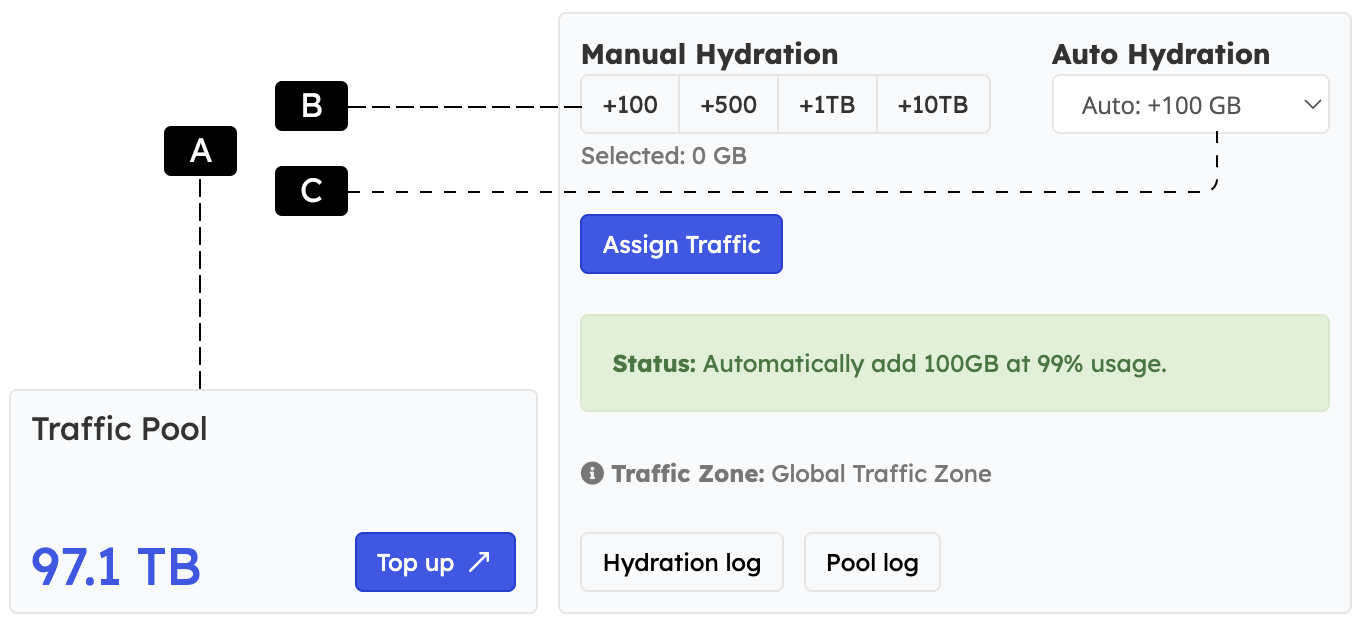 **A — Traffic Pool Balance**: shows remaining TB and provides a button to Top up
the pool.\
**B — Manual Hydration**: manually assign portions of +100 GB, +500 GB, +1 TB, or +10 TB to the selected VPS.\
**C — Auto Hydration**: choose a profile (e.g., +100 GB). The system automatically adds e.g. +100GB to your VPS at 99% traffic usage levels.
***
## Traffic Pool Balance Sheet
The traffic pool balance sheet (pool log) below works like a bank account statement.\
We log **traffic top-ups**, **pool traffic usage**, and the resulting balance after each transaction.\
This report (demo data below) provides a transparent overview of **traffic pool usage across your entire VPS hosting account**.
**How to Read the Balance Sheet**
* **Date/Time:** Timestamp of the transaction
* **Source:** VPS consuming traffic, a Traffic Pool Top-Up, or Starter Credit
* **Change:** Traffic added (positive) or used (negative)
* **New Balance:** Remaining traffic after the transaction
| Date/Time | Source | Change | New Balance |
| ------------------- | -------------------------------------------------------- | ------------- | ----------- |
| 2025-03-19 17:14:42 | kvm\_demo\_id105 | -100 GB | 6000 GB |
| 2025-03-19 15:01:33 | kvm\_demo\_id105 | -100 GB | 6700 GB |
| 2025-03-19 12:44:11 | **Traffic Pool Starter Credit (100GB) kvm\_demo\_id207** | **+100 GB** | 6800 GB |
| 2025-03-18 18:22:09 | kvm\_demo\_id105 | -1000 GB | 6700 GB |
| 2025-03-18 10:48:55 | kvm\_demo\_id304 | -500 GB | 7700 GB |
| 2025-03-18 10:45:02 | kvm\_demo\_id412 | -300 GB | 8200 GB |
| 2025-03-18 09:32:50 | **Traffic Pool Top-Up** | **+1000 GB** | 8500 GB |
| 2025-03-17 20:11:27 | kvm\_demo\_id105 | -1000 GB | 7500 GB |
| 2025-03-17 19:08:44 | kvm\_demo\_id105 | -1000 GB | 8500 GB |
| 2025-03-17 17:55:31 | kvm\_demo\_id207 | -500 GB | 9500 GB |
| 2025-03-12 11:22:54 | **Traffic Pool Top-Up** | **+10000 GB** | 10000 GB |
***
## Monitor and Refill
* Check pool balance and assignment history via the **Hydration log** and **Pool log** buttons.
* Email alerts fire at 80% pool usage; top up before the traffic pool is exhausted.
* Combine traffic pool with plan upgrades if your baseline traffic requirement grows over time.
Need more detail on usage graphs and throttling rules? \
See [Traffic Stats & Monthly Refills](./traffic-stats-refill-explained) and [Exceeded Monthly Traffic](./exceeding-monthly-included-traffic).
**A — Traffic Pool Balance**: shows remaining TB and provides a button to Top up
the pool.\
**B — Manual Hydration**: manually assign portions of +100 GB, +500 GB, +1 TB, or +10 TB to the selected VPS.\
**C — Auto Hydration**: choose a profile (e.g., +100 GB). The system automatically adds e.g. +100GB to your VPS at 99% traffic usage levels.
***
## Traffic Pool Balance Sheet
The traffic pool balance sheet (pool log) below works like a bank account statement.\
We log **traffic top-ups**, **pool traffic usage**, and the resulting balance after each transaction.\
This report (demo data below) provides a transparent overview of **traffic pool usage across your entire VPS hosting account**.
**How to Read the Balance Sheet**
* **Date/Time:** Timestamp of the transaction
* **Source:** VPS consuming traffic, a Traffic Pool Top-Up, or Starter Credit
* **Change:** Traffic added (positive) or used (negative)
* **New Balance:** Remaining traffic after the transaction
| Date/Time | Source | Change | New Balance |
| ------------------- | -------------------------------------------------------- | ------------- | ----------- |
| 2025-03-19 17:14:42 | kvm\_demo\_id105 | -100 GB | 6000 GB |
| 2025-03-19 15:01:33 | kvm\_demo\_id105 | -100 GB | 6700 GB |
| 2025-03-19 12:44:11 | **Traffic Pool Starter Credit (100GB) kvm\_demo\_id207** | **+100 GB** | 6800 GB |
| 2025-03-18 18:22:09 | kvm\_demo\_id105 | -1000 GB | 6700 GB |
| 2025-03-18 10:48:55 | kvm\_demo\_id304 | -500 GB | 7700 GB |
| 2025-03-18 10:45:02 | kvm\_demo\_id412 | -300 GB | 8200 GB |
| 2025-03-18 09:32:50 | **Traffic Pool Top-Up** | **+1000 GB** | 8500 GB |
| 2025-03-17 20:11:27 | kvm\_demo\_id105 | -1000 GB | 7500 GB |
| 2025-03-17 19:08:44 | kvm\_demo\_id105 | -1000 GB | 8500 GB |
| 2025-03-17 17:55:31 | kvm\_demo\_id207 | -500 GB | 9500 GB |
| 2025-03-12 11:22:54 | **Traffic Pool Top-Up** | **+10000 GB** | 10000 GB |
***
## Monitor and Refill
* Check pool balance and assignment history via the **Hydration log** and **Pool log** buttons.
* Email alerts fire at 80% pool usage; top up before the traffic pool is exhausted.
* Combine traffic pool with plan upgrades if your baseline traffic requirement grows over time.
Need more detail on usage graphs and throttling rules? \
See [Traffic Stats & Monthly Refills](./traffic-stats-refill-explained) and [Exceeded Monthly Traffic](./exceeding-monthly-included-traffic).