> ## Documentation Index
> Fetch the complete documentation index at: https://docs.edbb.com/llms.txt
> Use this file to discover all available pages before exploring further.
# Change Your VPS IP Address
> Swap the primary IPv4 on your EDBB VPS for free within 24 hours, or purchase a standard or bespoke change later on.
export const CtaButton = ({label, link, openInNewTab}) =>
{label}
;
You can refresh the primary IPv4 once per VPS for free within the first 24 hours. After that window, order a standard or bespoke change directly inside the EDBB Control Panel.
## Free IP Change
Every new VPS includes a one-time IP change at no cost during the first 24 hours from the delivery of your VPS.
Sign in to the
EDBB Control Panel
and pick the VPS from Services → My Products
.
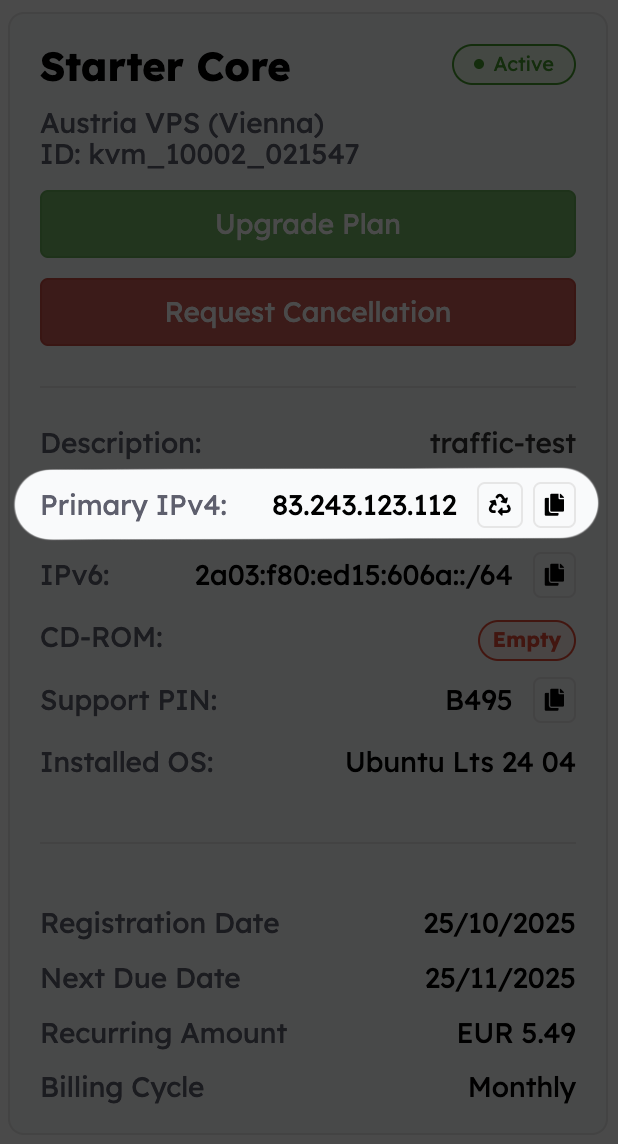
The summary card on the right lists Primary IPv4
with copy and refresh icons. This is where the free swap is triggered.
Click the circular arrows icon beside the IP, confirm the prompt, and the Control Panel will queue the replacement address.
If the refresh icon is greyed out or missing, the complimentary swap has been used—scroll down to the IP Change
button at the bottom of the page to order a paid change instead.
Once processed, reinstall the VPS or configure the new address manually—the previous IP stops responding immediately.
> **Please note:** The free IP change applies only to your primary IPv4 address. If you need to change any additional IPv4 addresses, you can do so using our paid **Standard** or **Bespoke IP Change** services.
***
## Paid IP Change After 24 Hours
If the free window has passed, choose one of two add-ons:
€5
per request. The Control Panel assigns the next available IPv4—perfect when you just need a fresh address.
€10
with a curated list of candidates so you can choose the exact IPv4 that fits your compliance or geolocation requirements.
***
## Don't Forget to Apply the New IP
After the change completes:
* Reinstall the VPS, **or**
* Configure the new IPv4 through the console or operating system tools.