> ## Documentation Index
> Fetch the complete documentation index at: https://docs.edbb.com/llms.txt
> Use this file to discover all available pages before exploring further.
# Paying Invoices with Account Credit
> Learn how to use your account credit balance to pay invoices in EDBB.
export const CtaButton = ({label, link, openInNewTab}) =>
{label}
;
### How to paying Invoices with Account Credit
Your **account credit balance** can be used to pay invoices directly from the EDBB Control Panel.
### Important Notes
* **Future invoices** are covered **automatically** as long as sufficient account credit is available.
* **Invoices that already exist** must be paid **manually** by applying credit to the invoice.
### How to Apply Credit to an Invoice
1. Sign in to your **EDBB Control Panel**
2. Navigate to the **Billing** section and open **My Invoices**
3. Select the invoice you want to pay
4. On the invoice page, look for the green **Apply Credit** area
5. Enter the amount you wish to apply (or the full outstanding balance)
6. Click **Apply Credit** to confirm
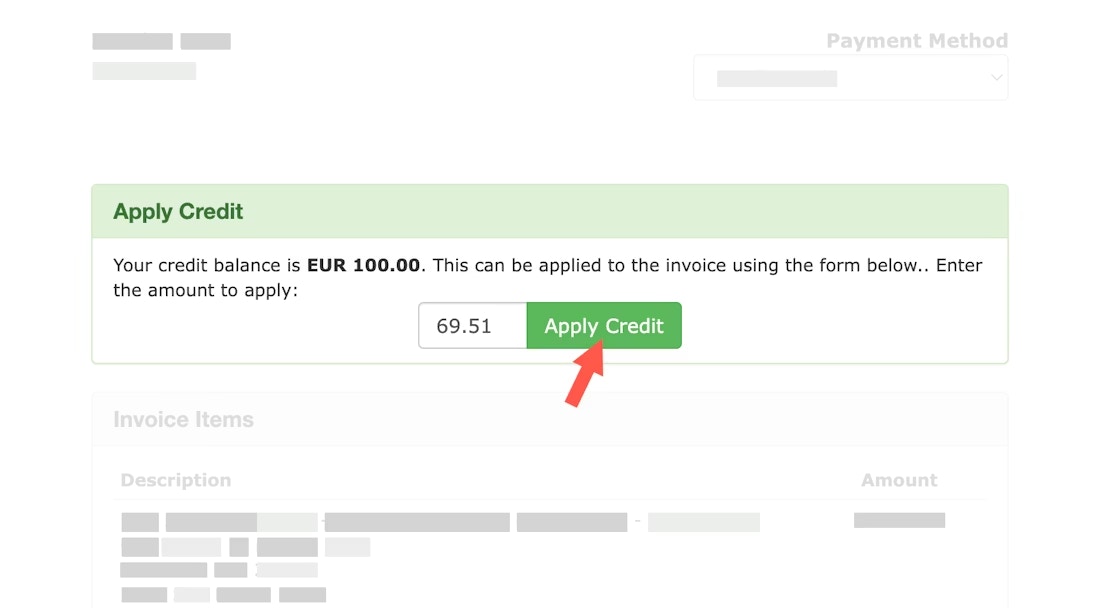 Once the full amount is applied, the invoice status will immediately change to **Paid**.
***
### Need to Add More Credit?
You can top up your account credit at any time and use it instantly for invoice payments.
Once the full amount is applied, the invoice status will immediately change to **Paid**.
***
### Need to Add More Credit?
You can top up your account credit at any time and use it instantly for invoice payments.